Best Peptide Tracker Apps 2026: 11 Apps Compared
Last updated: May 25, 2026 · Tested quarterly
At a Glance: 5 Peptide Tracker Apps Compared
Feature coverage based on publicly available app descriptions and App Store listings as of May 2026. Verify current details at each app's listing before purchase.
| App | Best For | Multi-Compound Depth | Calculators | Lab Tracking | Apple Health | Android | Free Tier | Price |
|---|---|---|---|---|---|---|---|---|
Regimen | Multi-compound stacks, lab tracking | Yes | Yes (4 built-in) | Yes | Yes | Yes | Yes (1 compound, all features) | $4.99/mo or $39.99/yr |
PeptIQ | iOS power users, AI vial scanner | Partial | Partial (AI scanner) | No | Yes | No | Yes (freemium) | Freemium |
PepTracker | iOS beginners, first protocol | Partial | No | No | No | No | Yes (up to 2 protocols) | Free / paid tier |
Smart Peptide Tracker | Android users, privacy-first, one-time purchase | Yes | Partial | No | Yes | Yes | Yes | $34.99 one-time |
Shotsy | GLP-1-only weight loss tracking | No | No | No | Partial | No | No | $49.99/yr |
Feature coverage based on publicly available app descriptions and App Store listings as of May 2026. Verify current details at each app's listing before purchase.
How We Evaluated These Apps
We ran each app through real protocols over multiple weeks. The criteria below reflect what actually matters when you are tracking peptide protocols day to day.
Multi-compound depth. Most people who get serious about peptides eventually run stacks. How many compounds does the app handle natively? Can you add custom compounds?
Pattern detection and intelligence. Does the app surface correlations between your doses, your sleep, your lab work, and your subjective markers over time? Or is it just a logbook?
Daily tracking depth. How many check-in markers can you capture? Journal entries, progress photos, injection site rotation?
Calculator coverage. How many calculators does the app include in-app? Reconstitution, reverse BAC water, oil-based dosing, nasal spray?
Health data integration. Does the app sync bidirectionally with Apple Health or Google Health Connect? Can you overlay lab results on your dose timeline?
Design and UX quality. A peptide tracker is something you open every day. Clean, professional design matters. Several apps in this space feel generic. The ones that invest in interface quality show up in long-term retention.
Protocol and cycle management. Long peptide protocols need cycle start and end dates, weekly summaries, and a way to share progress with a provider if needed.
Free tier scope. Does the free version let you track a full protocol end-to-end? Or is it a demo with hard feature walls?
Privacy stance. No data selling, full export capability, account deletion. Minimum bar for any health tracker.
The 5 Apps Reviewed
1. Regimen
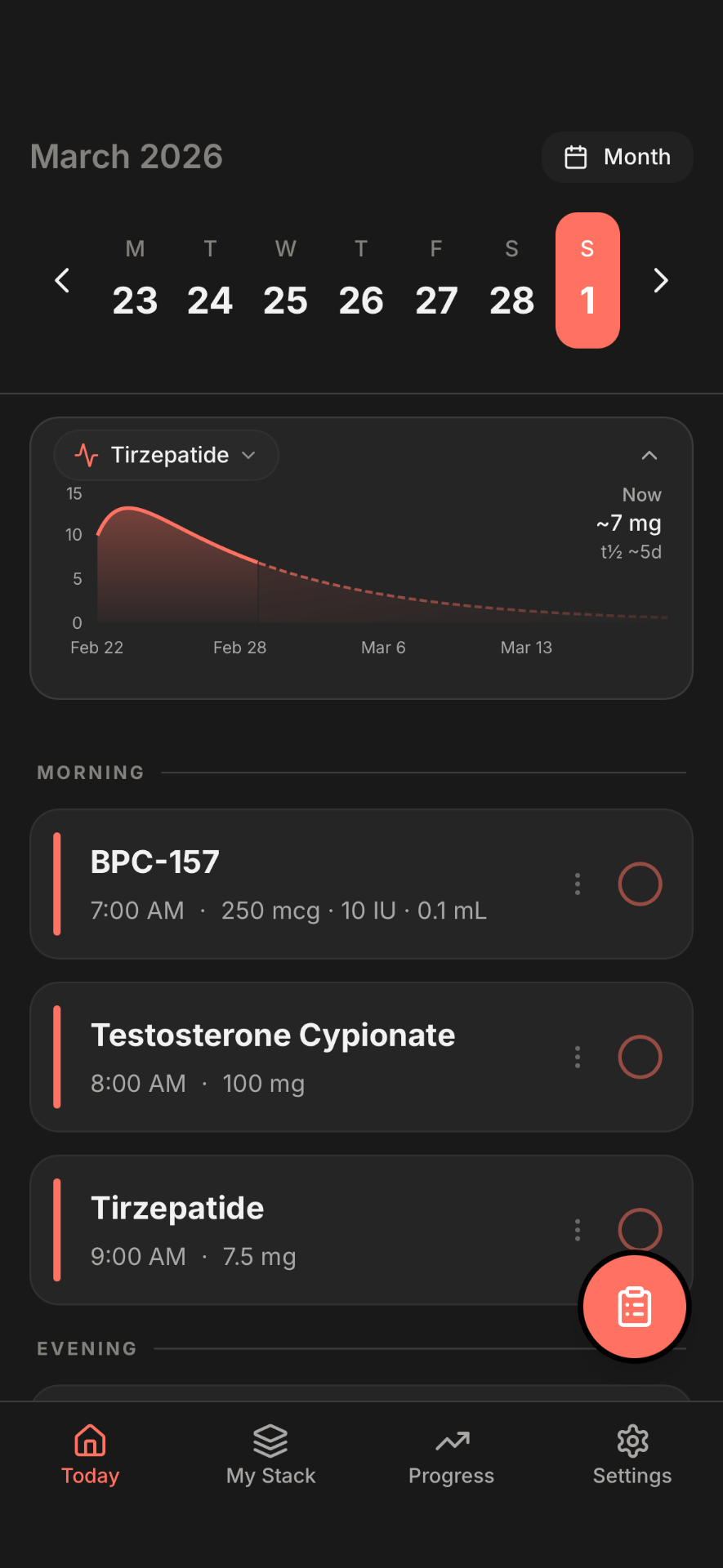
Regimen is a multi-compound peptide tracker built for people running more than one compound at once. It started as a peptide tracking tool and expanded as the user base showed up with increasingly complex stacks.
Pricing: Free for one compound with every feature included. Premium at $4.99/month or $39.99/year adds unlimited compounds for multi-compound stacking. Available on iOS, iPadOS, and Android.
Best for: Anyone tracking two or more compounds at the same time, or anyone who wants a genuinely complete free tier for a single compound without a feature wall.
Strengths:
- 150+ compound library with custom compounds. Covers peptides and complementary compounds in the same app. If the compound you're tracking isn't in the library, you can add it with your own parameters.
- Four built-in calculators. Peptide reconstitution, reverse BAC calculator, oil-based compound dosing, and nasal spray. The reconstitution calculator handles multi-vial batches and calculates exact units for any syringe type. No need to open a separate tool.
- Lab tracking with biomarker overlay. Upload or enter lab results and they plot on the same timeline as your dose logs. You can see whether a protocol change preceded a shift in a marker like IGF-1, testosterone, or fasting glucose.
- 50+ daily check-in markers. Energy, sleep, body weight, appetite, mood, compound-specific subjective markers, and custom markers. Tracks what is actually moving for you, not a generic wellness checklist.
- Signals pattern engine. Identifies correlations between your dose schedule and your logged health markers over time. The patterns surface in your weekly summary.
- Apple Health and Google Health Connect bidirectional sync. Weight, body fat, sleep, resting heart rate, and HRV flow in both directions. Works with any wearable or connected scale that writes to Apple Health.
- Injection site rotation tracking. Logs each injection site and shows the rotation history visually, useful for long-running protocols where site fatigue is a real issue.
- Cycle management and progress photos. Logs cycle start and end dates with before-and-after photo comparison mapped to the protocol timeline.
- Share-with-provider report. Exports a formatted PDF health summary for a healthcare provider conversation.
- Free tier is genuinely functional. One compound gets every feature: lab tracking, PK curve, all four calculators, all 50+ check-in markers, Apple Health sync, and injection site rotation. The free tier is not a teaser.
Trade-offs:
- Multi-compound tracking requires Premium. If you're only tracking one compound and have no plans to expand, the subscription is unnecessary.
- No AI chatbot or conversational interface. The app is built around structured logging and pattern detection, not conversational AI. If you specifically want an AI interface, PeptIQ approaches the problem differently.
Verdict: The most complete option for multi-compound peptide protocols and the only app in this list with both lab tracking and a full built-in calculator suite. For a single compound at no cost, the free tier holds up against anything else available.
2. PeptIQ
PeptIQ is an iOS peptide tracker with an AI chatbot and a vial scanner that reads the label and pre-fills compound details. The scanner is the differentiating feature.
Compare Regimen vs PeptIQ in depth.
Pricing: Freemium. iOS only. (Verified live May 25, 2026: 4.3 stars, 39 ratings on the App Store.)
Best for: iOS users who want a conversational AI interface and find manual compound entry tedious. The vial scanner makes initial setup faster than any other app in this list.
Strengths:
- AI vial scanner. Point the camera at a peptide vial label and PeptIQ reads the compound name and pre-fills fields automatically. Reduces manual entry errors during reconstitution setup.
- Chatbot interface. Answers questions about the compound you're logging without requiring you to open a browser. Convenient for quick reference during a protocol.
- Apple Health integration for biometric data.
- Active development with regular updates.
Trade-offs:
- iOS only. No Android version available.
- AI-generated chatbot answers carry the same accuracy risks as any AI-generated health content. There is no cited source for responses.
- No lab tracking or biomarker overlay.
- Feature depth outside the scanner and chatbot is thinner compared to apps with more structured tracking.
Verdict: The vial scanner is genuinely useful and saves setup time. Worth trying if you're on iOS and dislike manual compound entry. PeptIQ approaches tracking from the AI-convenience angle; Regimen approaches it from the structured-data-depth angle. They're solving slightly different things.
3. PepTracker
PepTracker is a clean, focused peptide dose logger that emphasizes simplicity. It has the largest review count of any dedicated peptide tracker on the App Store.
Compare Regimen vs PepTracker in depth.
Pricing: Free for up to 2 protocols. Paid tier unlocks unlimited protocols. iOS only. (Verified live May 25, 2026: 4.7 stars, 361 ratings.)
Best for: Someone starting their first or second peptide protocol who wants a straightforward dose log without setup overhead. PepTracker's review count is the strongest signal of real-world adoption in this category.
Strengths:
- 361 verified App Store ratings is the largest review count in this category. More reviews means more signal about real-world reliability.
- Simple and fast to set up. Name a compound, set a schedule, start logging. No onboarding asking for health history.
- Clean dose history view. Tap to log, tap to skip. The calendar view makes adherence easy to see at a glance.
- Generous free tier for up to 2 protocols.
Trade-offs:
- No built-in dose calculator. Reconstituting a vial requires a separate tool.
- No lab tracking, no health metric correlation, no Apple Health integration.
- iOS only, no Android version.
Verdict: The best starting point for a first protocol on iOS if simplicity is the goal. PepTracker earns its review count. Most users who start here eventually need more depth, which is where the decision between other apps comes in.
4. Smart Peptide Tracker
Smart Peptide Tracker is a peptide tracker for iOS and Android with a one-time pricing model and a privacy-first approach.
Compare Regimen vs Smart Peptide Tracker in depth.
Pricing: $34.99 one-time purchase (no subscription). iOS and Android. (Verified live May 25, 2026: 4.7 stars, 67 ratings.)
Best for: Android users who want a solid peptide tracker with Health Connect integration. Also the pick for anyone who philosophically prefers a one-time purchase to a monthly subscription.
Strengths:
- Android-first presence with Google Health Connect integration. Most peptide tracker apps are iOS-first with a thin Android version. Smart Peptide Tracker treats Android as a first-class platform.
- Apple Health sync on iOS as well.
- One-time pricing at $34.99. No ongoing subscription once you've paid.
- Privacy-focused design. No forced account creation or external data sync.
Trade-offs:
- 67 App Store ratings, which is a meaningful but smaller sample than PepTracker's 361. Less community validation available.
- No lab tracking or biomarker overlay.
- No built-in reconstitution calculator beyond basic unit conversion.
Verdict: The clear choice for Android users who want a peptide tracker that isn't an afterthought on their platform. The one-time pricing model is a genuine differentiator for users who dislike subscriptions.
5. Shotsy
Shotsy is built specifically for GLP-1 injections: semaglutide, tirzepatide, and similar weight-loss medications. It does not support peptides or multi-compound stacks. Everything in the app is designed for the GLP-1 use case.
Pricing: $49.99/year. iOS only. Apple iCloud sync.
Best for: GLP-1-only users who want a clean, purpose-built tracker with iCloud sync and don't need anything beyond dose logging, side effect tracking, and weight trends.
Strengths:
- Purpose-built for GLP-1 injection patterns. The interface is built around the titration schedules of semaglutide and tirzepatide, not adapted from a generic health app.
- iCloud sync across Apple devices.
- Side effect and weight tracking designed around GLP-1 patterns: GI side effects, hunger shifts, food noise changes.
- Clean, simple setup with no compound library to navigate.
Trade-offs:
- GLP-1 only. No peptide compound support whatsoever.
- No lab tracking.
- No Android version.
- Apple Health integration is read-only for weight, calories, protein, and water.
- $49.99/year with no free tier for full functionality.
Verdict: A well-built GLP-1 tracker for someone whose protocol is entirely GLP-1-based. Shotsy is included here because it ranks in this space and is worth naming honestly: it's excellent for what it does, but what it does is a different job from multi-peptide tracking. If you're combining GLP-1 with any peptides, Shotsy won't cover the full picture.
How to Pick the Right App for You
The choice depends on what you are actually tracking.
Multi-compound peptide stack (more than one compound at once): Regimen. The free tier handles one compound fully with every feature. Premium ($4.99/month) is what you need for a stack.
iOS only, starting your first protocol, want something simple and free: PepTracker. Largest review count, clean UX, no overhead.
Android, or you want one-time pricing instead of a subscription: Smart Peptide Tracker. Genuine Android support, $34.99 once.
AI-assisted compound entry, iOS only, willing to pay for convenience: PeptIQ. The vial scanner speeds up setup. The chatbot handles quick reference questions in-app.
GLP-1-only tracking, iOS, want an Apple ecosystem experience: Shotsy. Purpose-built for this specific use case and does it well.
One note: PepTracker and Smart Peptide Tracker are both solid free or low-cost starting points for simpler protocols. Regimen's free tier is also genuinely complete for one compound, so trying it before committing to Premium costs nothing.
What Regimen Users Actually Track
The following stats come from the Regimen 2026 Peptide Tracking Report at /blog/state-of-peptide-tracking-2026. They reflect patterns across the active user base as of early 2026.
Read the full tracking report at State of Peptide Tracking 2026 for compound-by-compound breakdowns and dosing schedule data.
Frequently Asked Questions
What is the best peptide tracker app in 2026?
For multi-compound protocols, Regimen is the most complete option in this category. For a single protocol on iOS with no cost, PepTracker is the most widely adopted. For Android users, Smart Peptide Tracker is the strongest option. The best app depends on what you're tracking and which platform you're on.
Is there a free peptide tracker app?
Yes. PepTracker is free for up to 2 protocols on iOS. Smart Peptide Tracker has a functional free tier. Regimen is free for one compound with all features enabled: lab tracking, four calculators, 50+ check-in markers, and Apple Health sync.
What is the difference between a peptide tracker and a peptide calculator?
A calculator handles the math: how many units to draw for a given dose, how much BAC water to add to a vial, what concentration a reconstituted vial has. A tracker logs doses over time, schedules reminders, and records how you feel. Regimen does both. PeptIQ includes an AI-assisted vial scanner that bridges setup between the two. PepTracker focuses on tracking without a built-in calculator.
Which peptide tracker works on Android?
Regimen and Smart Peptide Tracker both have native Android support with Google Health Connect integration. PepTracker, PeptIQ, and Shotsy are iOS only as of May 2026.
Do any peptide tracker apps include lab tracking?
Yes. Regimen includes lab tracking with biomarker overlay on the dose timeline. You can enter or upload lab results and see them plotted alongside your protocol log, covering panels like testosterone, IGF-1, fasting glucose, lipid panels, and custom markers. The other four apps in this list do not currently include lab tracking.
Can I track GLP-1s and peptides in the same app?
Yes, if the app supports multiple compound categories. Regimen handles GLP-1 compounds and peptides in the same protocol view. Shotsy is GLP-1 only and does not support peptide compounds.
What app has the most reviews for peptide tracking?
PepTracker has the largest verified review count in this category: 4.7 stars with 361 ratings on the App Store as of May 25, 2026. Smart Peptide Tracker carries 4.7 stars with 67 ratings. PeptIQ has 4.3 stars with 39 ratings. Review counts are live figures that change over time.
Does Regimen have a free tier?
Yes. The free tier includes full functionality for one compound: lab tracking, pharmacokinetic curve, all four built-in calculators, all 50+ check-in markers, Apple Health and Google Health Connect sync, and injection site rotation. Premium ($4.99/month or $39.99/year) adds unlimited compounds for multi-compound stacking.
This article is for informational purposes only and does not constitute medical advice. Consult a qualified healthcare provider before starting any compound protocol.
Ready to track your protocol?
- Smart reminders so you never miss a dose
- Track weight, photos, and progress over time
- Medication level curves for every compound