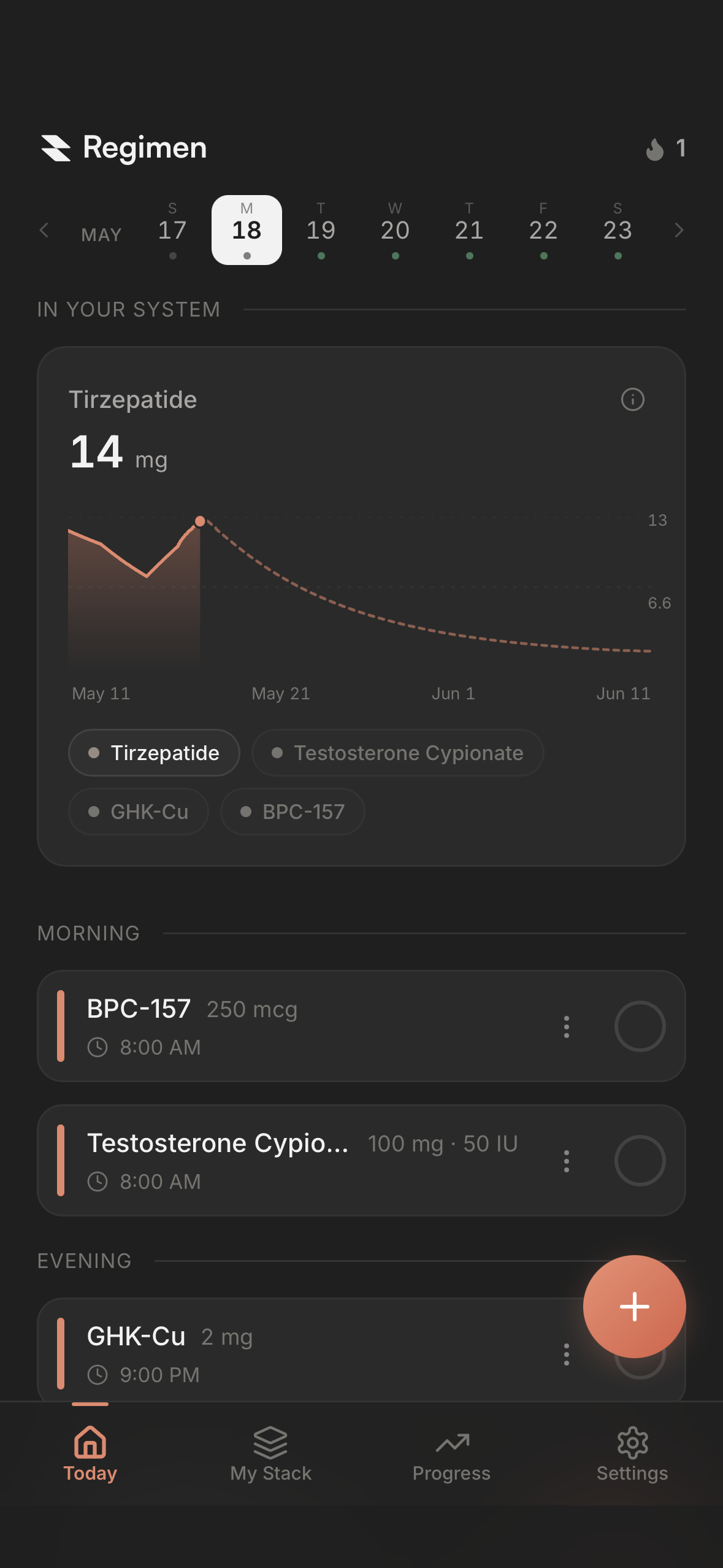
There are dozens of peptide trackers, and on the surface they all look the same: log a dose, get a reminder, see a curve. Dig in and the differences show up fast, mostly in whether the app helps you make sense of your health or just stores what you took. Here’s what actually separates them, and why each one matters.
What is a peptide tracker app?
A peptide tracker app records every peptide dose you take, what, how much, when, and where you injected it, and keeps that history in one place so you can see your protocol instead of remembering it.
The good ones do four jobs. They log the dose in a tap or two. They remind you on the schedule your protocol actually runs on, which for peptides is rarely once a day. They do the reconstitution math, turning a vial size and a volume of bacteriostatic water into the number of units to draw. And they keep track of where you injected, so you’re rotating instead of guessing.
The better ones do a fifth job: they help you make sense of it. Logging tells you what you took. A good tracker connects the dots between what you took and how you’ve been feeling, what your labs say, and what your weight and sleep are doing, so you can see your patterns instead of hoping to notice them.
A spreadsheet can do the first four. It can’t do the fifth.
How to evaluate a peptide tracker
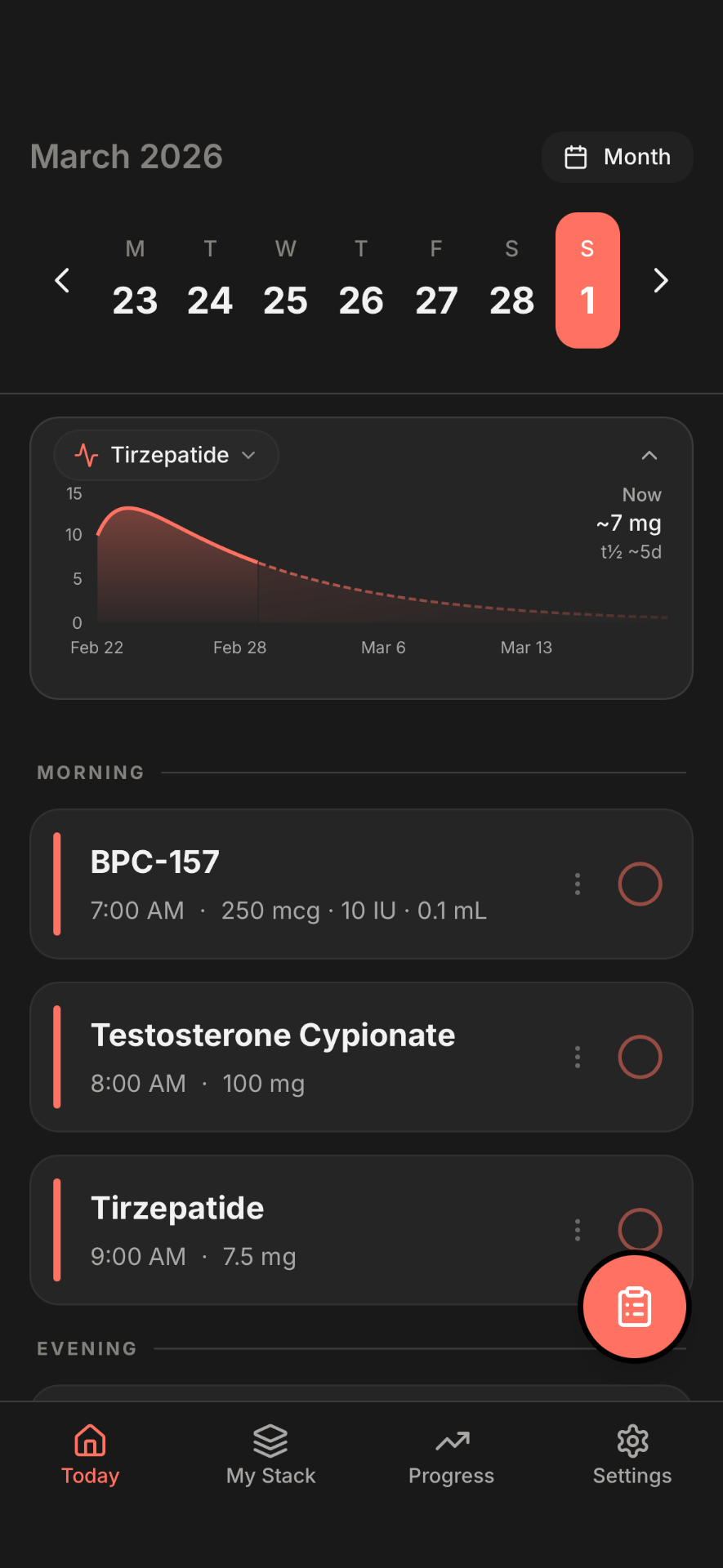
Assume any tracker worth installing logs a dose, reminds you, and draws a half-life curve so you can see roughly how much of each compound is still in your system. Those are the basics. What follows is what separates the app you actually use from the one you don’t, in roughly the order it starts to matter.
1. Protocol and cycle management
Every peptide comes with its own schedule. Some are once a day before bed. Some are first thing in the morning on an empty stomach. Some run every other day, some twice a week, some once a week. Some run in cycles, eight weeks on and four off. Some you titrate up over a month. Run two or three at once and you’re managing a lot of moving parts from memory.
That’s the first job of a tracker, and it’s the one most of them do badly. A basic app gives you daily or weekly and a reminder. What you actually need is an app that can hold whatever you’re on now and whatever you add later: any frequency, a different dose or a different time on different days, a cycle with a real end date, a step-up that moves you along on its own. If you have to bend your protocol to fit the app, you stop trusting the reminders, and a tracker you don’t trust is one you stop opening. One Regimen user put it this way in an App Store review: “The first and only app that I’ve found that has the ability to record cycling and allows you to set the weeks on and weeks off.”
How varied are real protocols? In Regimen’s own user data as of September 2026, 54% of active users run compounds on more than one kind of schedule at the same time. Daily dosing is the most common at about a third of active compounds, then weekly at 27%, specific days of the week at 20%, twice a week at 10%, and every-X-days schedules making up most of the rest. A quarter of active users have at least one compound on a cycle, and 13% have one on a titration schedule. That’s the range a tracker has to handle.
2. Reconstitution and dose math
Most peptides come as a powder you reconstitute yourself, so the tracker has to do that math: vial size in, water added, units to draw out. That’s the basic version, and it’s a staple.
Where it gets useful is the other direction. You know the dose you want and the syringe you have, and you want the app to tell you how much water to add so the number lands cleanly on the barrel. That’s a reverse calculator, and the first time you need one you’ll wonder how you managed without it. Then the ones plenty of people end up needing anyway: oil-based compounds, which don’t reconstitute at all, and nasal sprays, which are measured in sprays rather than units.
More calculators isn’t the point. The right ones for what you’re actually taking, inside the same app you log in, is.
3. Health metrics
The point of tracking was never the dose. It’s what the dose is doing to you. So you want to track your health metrics alongside what you’re taking: weight, body fat percentage, resting heart rate, blood pressure, glucose, sleep. These are the numbers that tell you how your health is trending, and they’re the ones that move without you noticing.
A basic app gives you a weight field. A good one lets you track all of these, and pulls them in automatically from Apple Health or Health Connect when your watch or your scale already has them, so you’re not typing numbers into a second app every morning. You can always enter a reading by hand, but the ones that come in on their own are the ones that actually get tracked.
Weight is the big one, and if you’re running peptides alongside a GLP-1, like most people are now, it’s the number you watch closest. Resting heart rate is the quiet one. In Regimen’s own user data, it’s the single most-logged health metric, ahead of weight, and 94% of active users had a health metric on their timeline in the last 90 days.
4. How you’re responding
Health metrics are the numbers. This is the other half: how you actually feel on what you’re taking. Side effects are part of it. So is everything else that shifts when you start or change something: energy, sleep quality, mood, appetite, joint pain, recovery, focus, skin, libido.
A basic tracker gives you a short list, usually nausea, hunger and energy, and that’s a real start. The problem is that everyone’s different. For one person anxiety is the thing to watch. For another it’s afternoon energy, or how their knees feel on the stairs, or whether they slept through the night. What you need is something that adapts to you: a list wide enough that the thing happening to you is on it, from anxiety to joint pain to how your skin looks, a place to write a note in your own words, and all of it on the same timeline as your doses. Otherwise, a few months in, you have a record of what you took and no real record of what it did.
Progress photos belong here too. Taken every few weeks and compared side by side, they show the change the scale can’t, and they’re the thing you’ll want when you’re deciding whether a protocol earned another cycle.
5. Injection site tracking
You don’t want to inject in the same spot too often or too close together. Do it and the skin gets sore and bruised, the tissue underneath hardens, and absorption gets uneven, so the same dose doesn’t land the same way twice. The fix is rotation, and rotating from memory is exactly the thing that fails on a busy week.
Basic site tracking writes down where the last shot went. A good tracker goes a lot further: it suggests where the next one goes, lets you add your own spots instead of only the standard ones, gives each compound its own spots and its own rotation if you’re injecting more than one thing, and lets you rest a spot while it heals. That’s the difference between an app that records your rotation and one that runs it for you.
In Regimen’s own user data, 36% of active users logged an injection site in the last 90 days, and 9 in 10 of those injections were subcutaneous.
6. Lab work
The compounds you’re running affect your health in ways you can feel and in ways you can’t. IGF-1, fasting glucose, lipids, hormone levels, liver and kidney markers. Bloodwork is how you find out which way things are moving, and it’s the one measurement that doesn’t depend on how you happened to feel that week.
For most people, labs live in an email or a patient portal, nowhere near their doses. A good tracker gives you one place for all of it, ideally by scanning the report so you’re not typing in thirty numbers. Then it overlays your bloodwork with what you were taking: when you started a compound, when you changed a dose. That’s how you see that a marker moved after a step-up, or that a new compound lined up with a change you’d never have connected on your own, and how you understand what all of this is actually doing to your health.
7. Pattern detection
You’re taking compounds. Your body is responding. The question is how you’d ever know what’s connected to what, when the answer is spread across doses, check-ins, weight, sleep, labs and the curve of each compound in your system. Pulling the data in is one thing. Making sense of it is the part that matters.
That’s the job of pattern detection: the app looks across everything you’ve logged, lines it up against the dates you changed something, and tells you what it finds. Your sleep improved after you added that compound. Your energy dipped the week you went up a dose. Your resting heart rate has been drifting up since you started something new.
Most trackers stop at logging. The good ones help you see what’s working, catch a problem early, and watch your progress across every marker in one place instead of scrolling back through months of entries hoping something jumps out. One Regimen user, Steve, put it this way in a Google Play review: “It caught the heart rate increase from Reta before I did.”
8. Supply tracking
Whether it’s a vial from a research supplier, a compounded prescription, or capsules, your supply has an expiration, a beyond-use date once it’s mixed, a number of doses left, and a reorder lead time. Most people find out they’re low on the night they’re due.
A good tracker knows what you have on hand, when you got it, when it expires, what it cost, and reminds you to reorder before you’re short. It’s a small feature until the first time it saves you a missed week. One Regimen user, Eric, described it in an App Store review as “always know how many days of a compound are left, so I don’t run out mid cycle.”
9. Ease of use
A lot of tracking apps pack in features and then make you figure out how to set them up and where everything lives. That’s exhausting, and it’s why people quit. The good ones have the sophistication underneath and stay simple on top: log a dose in a tap or two, check in without filling out a form, and see what you need without going looking for it. It’s the thing people notice first. Apple’s summary of Regimen’s App Store reviews reads: “Users find the app effective for comprehensive tracking. They appreciate its customizable cycles and dosage calculator. Reviewers also praise the clean and easy-to-use design.”
10. Privacy and your data
This is your health data, and what you’re tracking is your business. You want an app that doesn’t sell it or share it. Most say they don’t. It’s still worth a glance at the App Store privacy label, and worth remembering that if an app is completely free with nothing to buy, it’s making money some other way.
And it’s your data. You should be able to bring it in from a spreadsheet or another app, export all of it whenever you want, and delete your account and everything in it.
Picking the right tracker for where you are
Just starting out, one or two compounds. Ease of use matters most, and a free tier that lets you run a full protocol without paying. Pick something you’ll actually open, and make sure it can grow with you, because the second compound always comes.
Running a stack. Scheduling is everything. If the app can’t hold different frequencies, doses and times across several compounds, and rotate sites for each one, you’ll be managing half of it from memory anyway. Lab work starts to matter here too, because the more you’re running, the less you can tell by feel.
Dialing it in. You’ve got months of data and you want to know what’s working. This is where health metrics, lab work and pattern detection earn their place, and where a tracker that only logs starts to feel like a notebook.
Want to see how the apps actually stack up on these? We ran every one through the same criteria in our ranked comparison of the best peptide tracker apps.
What we believe a peptide tracker should do
We built Regimen around a simple idea: the app should adapt to you, not the other way around. Whatever compounds you run, on whatever schedule, it should hold all of it without you simplifying anything. It should capture how your body is responding, in numbers and in your own words. And it should help you see the big picture, because that’s the whole reason you’re tracking.
That’s why the scheduler handles daily, specific days, every X days, and a split week with its own dose and time on each day, plus cycles and titration. It’s why there are 50+ daily markers instead of a handful, why your bloodwork can be scanned in and plotted against your doses, and why injection sites can be your own spots with a separate rotation per compound. And it’s why pattern detection watches all of it and tells you what changed after you changed something.
We didn’t get there by guessing. We talk to users every day, and we run a public feature request board where people vote on what gets built next. That’s also why Regimen doesn’t tell you what to take. People running peptides want a tool they control, not a chatbot making calls for them.
It’s simple on the surface and deep underneath, on iPhone, Android and the web, and free for your first compound included.
The bottom line
A basic peptide tracker logs what you took and reminds you when the next one is due. A good one holds the exact schedule you run, keeps your supply straight, does the math in the direction you need it, and runs your injection site rotation so you’re never guessing. The one worth having does all of that and then helps you understand your health: your metrics, your labs and how you feel, lined up against what you’re taking, with the patterns pointed out so you can see what’s working and fix what isn’t. The reminders and the half-life curves are standard now. That last part is what you’re really choosing on.
Ready to track your protocol?
- Your whole stack, on the schedules you actually run
- Labs and daily markers on the same timeline as your doses
- Tells you what changed after a dose change
Frequently asked questions
What matters most in a peptide tracker?
Whether it can hold the protocol you actually run, and whether it helps you make sense of what you're logging. Every tracker worth installing logs a dose and does the reconstitution math. What separates them is scheduling that keeps up with a real stack, bloodwork on the same timeline as your doses, and pattern detection that connects how you feel to what you changed.
Which run on Android, not just iPhone?
Regimen runs on iPhone, Android and the web. Several popular peptide trackers are iPhone only, so check the platform line on the store listing before you get attached. Our ranked comparison lists platforms app by app.
Which one tells me if my protocol is working?
Regimen. It watches your doses, medication levels, bloodwork and daily markers against what changed in your protocol, a new compound, a dose change, cycling off, and tells you the pattern it finds. It is pattern detection built into the app, not a chatbot, and it is included free.
Can a peptide tracker plan a titration schedule?
The good ones can. You set the starting dose, the step size and the interval, and the app moves you up on schedule and adjusts the reminders and the syringe units as it goes. In Regimen's own user data, 13% of active users have at least one compound on a titration schedule and 26% have one on a cycle.
Do peptide tracker apps track bloodwork?
Some do, and it is one of the biggest differences between them. Look for one that holds your lab markers on the same timeline as your doses, so a change in IGF-1 or fasting glucose sits next to the dose change or new compound that came before it. Regimen does this, and can read the markers in from a photo of the report.
How do I judge an app's privacy?
Look for an app that doesn't sell or share your health data, and check the App Store privacy label rather than the marketing. Then make sure it's your data: you should be able to export all of it and delete your account whenever you want. This article is for informational purposes only and does not constitute medical advice. Discuss all treatment decisions with your healthcare provider.