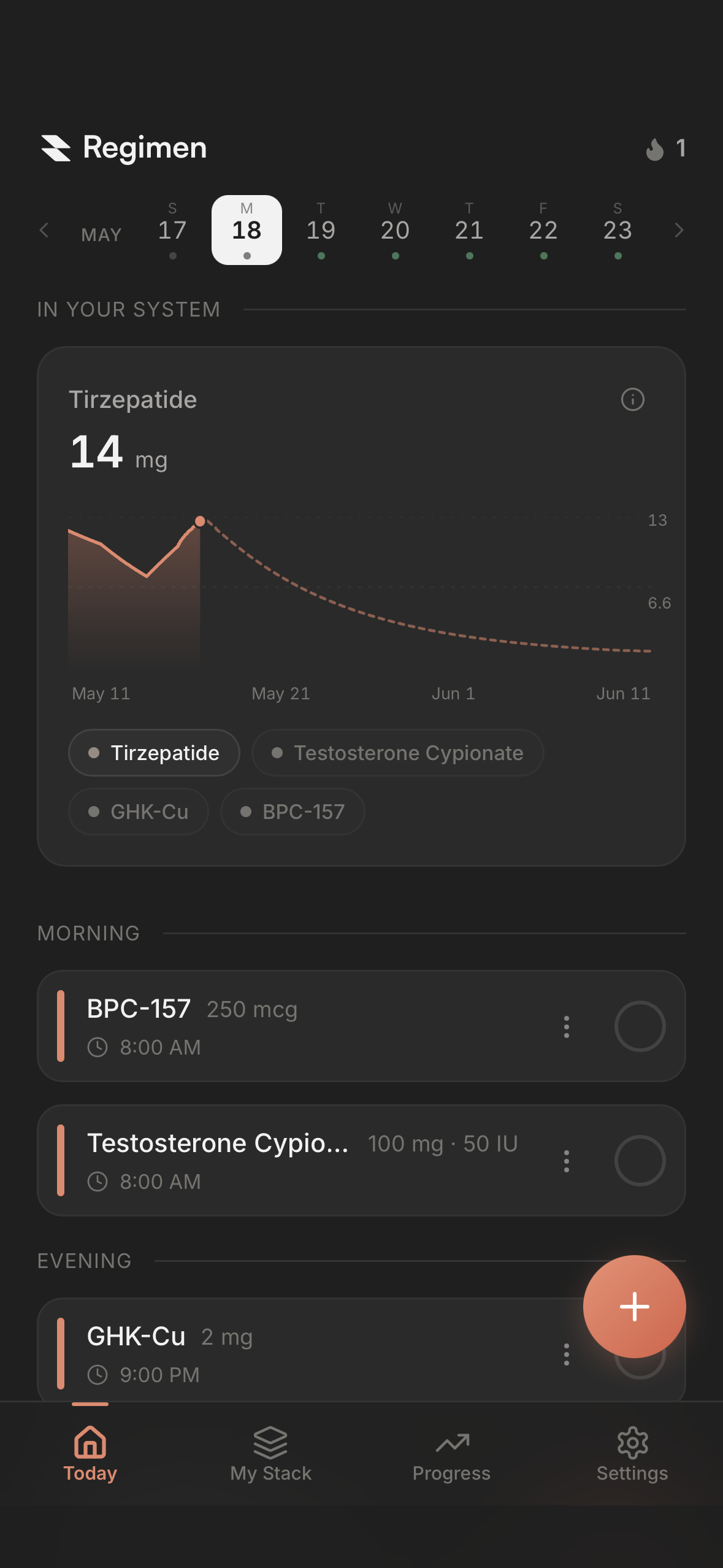
There are a lot of GLP-1 trackers out there, and on the surface they all look alike. Every one of them will log the shot and remind you when the next one is due. What separates them is how much of your health picture they show you: how you’re responding, how you’re progressing, and whether it’s working. Most do a basic job of that. Here’s what to look for, and why each one matters.
What does a GLP-1 tracker actually track?
A GLP-1 tracker is a phone app for people using Ozempic, Wegovy, Mounjaro or Zepbound, or a compounded or oral version, for weight loss or blood sugar. It records your weekly shot and everything that happens in the days after it: the dose and the date, a reminder before the next one, your weight, your side effects, where you injected, and for most apps now, roughly how much medication is still in your system.
How to evaluate a GLP-1 tracker
Assume any app worth installing logs a shot, reminds you, and charts your weight. Those are the basics. What follows is what separates the app you actually use from the one you don’t, in roughly the order it starts to matter.
1. Side effect tracking
Nausea, constipation, reflux, fatigue, hunger and food noise coming back. They cluster in the days after a shot and the weeks after a step-up, and how they move over time is the first thing your doctor wants to know at the next appointment. It’s also how you work out whether a rough week was the medication settling or a dose you can’t stay on.
A basic app gives you a checkbox and a short list, usually nausea, hunger and energy, and that’s a real start. But everyone responds differently, and the thing happening to you might be heartburn, bloating, sulfur burps, night sweats, hair shedding, a sore injection site, or the fact that you stopped wanting a drink. What you want is a list long enough to fit you, a way to log how bad it was and on which day, and all of it sitting next to the dose you took, so a bad week has a cause attached to it instead of blurring into the next one.
In Regimen’s own user data as of September 2026, the side effects GLP-1 users log most are energy, hunger, nausea and constipation, each tracked by more than a third of active GLP-1 users. Next on the list, at 30%, is how much they feel like drinking.
2. Titration schedules
Almost everyone on a GLP-1 is on a plan: start at the lowest dose, move up every few weeks, settle at the dose that works. You were given the plan. The question is whether your app knows it.
A basic app makes you remember when the next step is and change the dose manually, which is how people end up a week late on a step-up or logging the old dose for a month. A good tracker lets you enter the plan once, starting dose, step size, interval, and then moves you up on schedule, changes the reminders and the pen clicks with it, and marks each step on your charts so you can see what changed when. You stay on the plan you were given without having to think about it. Very few GLP-1 apps do this properly, and it’s one of the first things to check.
3. Medication level charts
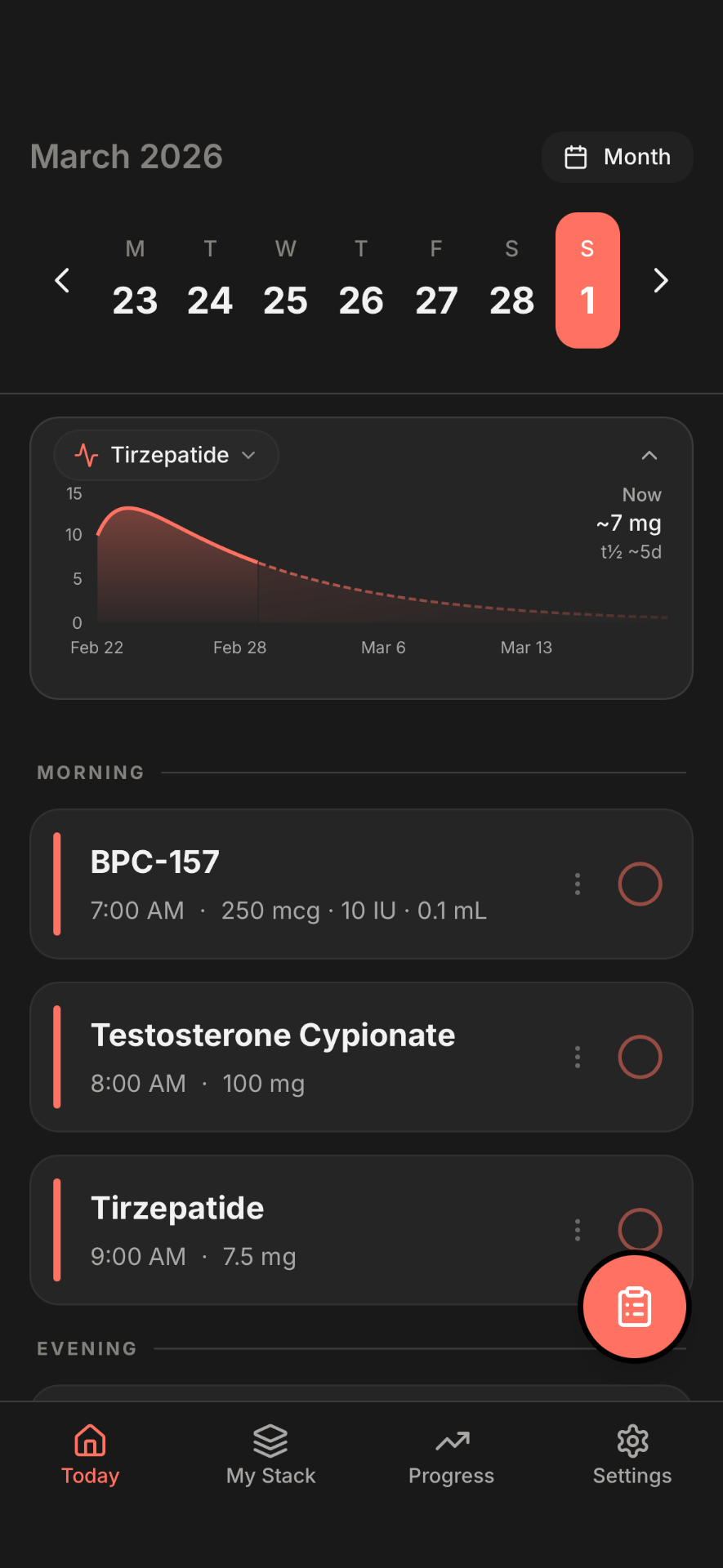
This chart shows roughly how much medication is in your system on any given day. It matters because these drugs don’t work like a pill you take and feel an hour later. Semaglutide has a half-life of about a week, tirzepatide about five days, and each weekly shot stacks on what’s left of the last one. Your level climbs for the first four to five weeks before it settles, which is why the first month feels different from the second, why the days right after a shot can feel stronger than day six, and why staying consistent pays off in a way you can’t feel yet.
Seeing that curve gives you something the pen can’t: a sense of where you are. It’s an estimate built from published data, not a blood test, but it takes the randomness out of the week and tells you when you’ve actually reached the level the dose is supposed to deliver. Look for one that runs off your real shot dates rather than a textbook weekly, and check whether it’s included, because this is the feature most often put behind a paywall.
4. Progress tracking
You’re on this medication to get somewhere. Progress tracking is how you know you’re getting there, and the scale is only one part of it. Weight loss stalls for weeks at a time even when things are working. Body fat percentage, resting heart rate, blood pressure and sleep keep moving while it does, and they’re the numbers your doctor is actually watching.
A basic app gives you a weight chart. A good one gives you all of it on one screen, with every dose change marked so you can see what moved what, and pulls the numbers in automatically from Apple Health or Health Connect when your watch or scale already has them. You can always type a reading in; the point is that the whole picture is in one place.
Two more pieces belong here. Progress photos: almost everyone wishes they’d taken one at the start. They show how far you’ve come in a way the number can’t, and they’re something to be proud of. And a comparison against the clinical trials, so you can see roughly where people on your medication and your dose were at your week and know whether you’re on track. Both are a record of what you’ve done, and both are what keep people going through a slow month.
In Regimen’s own user data, 94% of active GLP-1 users logged a health metric in the last 90 days, and more than half tracked something beyond weight.
5. Injection site tracking
The instructions that come with the pen tell you to rotate sites and avoid skin that’s sore or bruised, because repeated shots in the same spot can harden the tissue and absorb the medication unevenly. Remembering where last week’s went is the part that fails.
Basic tracking logs the site. A good tracker suggests the next site for you, or lets you build your own rotation: your own spots, the ones you want suggested and the ones you don’t, and a spot rested until it’s ready again. In Regimen’s own user data, 37% of active GLP-1 users logged an injection site in the last 90 days.
6. Supply tracking
Whether you’re clicking a pen or drawing from a vial, you have a fixed number of doses, a date they run out, and a beyond-use date once a vial is mixed. A good tracker keeps all of that straight, along with what you paid and where it came from, and tells you when to reorder so you’re never staring at an empty pen on shot day with the pharmacy closed. Very few GLP-1 apps do this properly.
7. Lab work
Most providers recommend checking your labs on a GLP-1: A1c, lipids, liver and kidney panels, sometimes thyroid. Those numbers tell you how your body is responding in ways the scale can’t.
They usually land as a PDF in a portal and never meet the rest of your history. A tracker that holds your labs on the same timeline as your doses, ideally by scanning the report, overlays each marker with when you started and when you stepped up, so you can see that your A1c moved after a dose change and walk into your next appointment with the actual data instead of a memory of it. Almost no GLP-1 app does this. The ones worth having do.
8. Pattern detection and insights
Your body is telling you something every week. The question is how you’d know what. A rough Tuesday, a good stretch of sleep, hunger that showed up on day five, a resting heart rate that’s drifted: on their own they’re noise, and no one can hold all of them in their head at once.
That’s the job of pattern detection. The app pulls together your side effects, your doses, your medication levels, your weight and your labs, lines them up against the dose you were on, and tells you what repeats: your nausea eased three weeks running after the step-up, your hunger comes back around day five. Look for insights tied to something real, like a dose change, and measured against your own baseline rather than an average. Two people on the same dose have two different months. One Regimen user, Steve, on tirzepatide and then retatrutide, put it this way in a Google Play review: “It caught the heart rate increase from Reta before I did.”
9. Reports for your provider
Whoever manages your medication can only adjust your plan based on what they know, and what they know is usually what you remember in the room. A tracker that builds a summary for you, your shots, dose changes, weight, side effects and labs since your last visit, changes that. They see how you’ve actually been responding, they can tune the dose and the timing to you, and you get better care out of the same appointment.
10. Privacy and your data
This is your health data. You want an app that doesn’t sell it or share it, and most say they don’t. It’s still worth a glance at the App Store privacy label, and worth remembering that if an app is completely free with nothing to buy, it’s making money some other way.
And it’s your data. You should be able to bring in your history from a spreadsheet or another app, export all of it whenever you want, and delete your account and everything in it.
Picking the right tracker for where you are
Just starting. The first month is the build-up: your level is climbing toward where the dose really works, and the side effects are at their loudest. The medication level chart tells you where you are in that climb, and side effect tracking gives every rough day a reason. Pick something easy enough that you’ll actually open it.
Moving up doses. This is where a titration schedule earns its place, so each step happens on time without you tracking it in your head. Pattern detection starts to matter here too, because the question at every step is the same: was that week rough because of the new dose, or something else?
Months in. You’ve got real history now, and the scale has probably stalled at least once. Progress tracking beyond weight shows you what’s still moving, lab work shows what the scale can’t, and a report for your provider turns all of it into a better conversation about where to go next.
Want to see how the apps actually stack up on these? We ran six GLP-1 apps through these same criteria in our ranked comparison of the best GLP-1 tracker apps.
What we believe a GLP-1 tracker should do
You’re the one doing this. The medication is remarkable, but the results come from you showing up every week, noticing what’s changing, and adjusting with your doctor. A tracker should make that easier and clearer. That’s what we built Regimen to be.
Start with the plan you were given. Enter your titration schedule once and Regimen moves you up on the right day, changes your reminders and your pen clicks to match, and marks every step on your charts. You stay on the plan without thinking about it.
Then see where you are. The medication level chart shows your level building over the first weeks and settling into the range where the dose does its work, so a rough day two and a hungry day six make sense, and consistency has a picture attached to it. It’s free.
Track how you’re responding, in your terms. Regimen has the most complete side effect tracking in the GLP-1 space, 50+ markers, so the thing happening to you is on the list, from food noise to heartburn to how much you feel like drinking, each with a level and a date, next to the dose you took.
Watch your progress across everything, not just the scale. Weight, body fat, resting heart rate, blood pressure and sleep come in from Apple Health or Health Connect on their own and sit on one timeline with every dose change marked. Progress photos live alongside them, and you can see roughly where the clinical trials had people at your dose and week. When the scale stalls, you’ll know what’s still moving.
Let the app run your injection sites, or build your own rotation. Use the standard spots or add yours, choose which ones get suggested, rest one that’s sore. Either way you never inject the same place twice in a row without meaning to.
Put your bloodwork next to your doses. Scan the report or type it in, and each marker lands on your timeline so you can see what a step-up did to your A1c. That’s rare in GLP-1 apps, and it’s what turns an appointment into a real conversation about where to go next.
Then let Regimen tell you what it noticed. It pulls together your side effects, doses, levels, weight and labs, and tells you what repeats: what got better after the step-up, what shows up on day five, what’s drifting. Measured against you, not an average. When it’s time to check in with whoever manages your medication, a one-page report of all of it is ready to share.
Your history comes in from a spreadsheet or another app and goes out whenever you want. It’s free for your first medication, on iPhone, Android and the web.
The bottom line
These medications can change your life, and the right app helps you get the most out of them. Pick the one that follows the plan you were given, shows you where you are as the medication builds, tracks how your body responds in enough detail to fit you, shows your progress across more than the scale, keeps your labs next to your doses, and tells you what it all means. You’re the one doing the work. The app’s job is to make sure you can see it paying off.
Ready to track your GLP-1?
- Your titration plan, followed for you
- Side effects, progress and labs on one timeline
- Tells you what changed after a dose change
Frequently asked questions
What's the most important thing in a GLP-1 tracker?
Whether it helps you understand how your body is responding, not just log the shot. Logging is easy and every app does it. The apps worth keeping track your side effects and your progress in enough detail to fit you, follow the titration plan your doctor set, and connect what you're feeling to the dose you're on.
Do I need a GLP-1 tracker if I only take one shot a week?
Yes, and the weekly shot is the smallest part of it. The six days after the shot are where the side effects, the appetite changes and the results happen. A good tracker gives you a record of all of that against your dose, so you can see what's working, catch what isn't, and show your doctor something better than memory at the next appointment.
Which app shows my medication levels for free?
Regimen includes the medication level chart on its free tier. This is the feature most often put behind a subscription in this category, so check before you commit. Our ranked comparison lists it app by app.
Can a GLP-1 tracker follow my titration schedule?
The good ones can. You enter the plan your doctor gave you once, the starting dose, the step and the interval, and the app moves you up on schedule, changes the reminders and the pen clicks with it, and marks each step on your charts. Regimen does this. Very few GLP-1 apps do.
Which app helps me see patterns in how I feel?
Regimen is strongest here. It pulls together your side effects, doses, medication levels, weight and labs, lines them up against the dose you were on, and tells you what it found, measured against your own baseline instead of an average. It's built-in pattern detection, not a chatbot, and it's free.
Can any GLP-1 app track my bloodwork?
Regimen does: scan the report or enter it by hand, 25+ markers, on the same timeline as your doses, so you can see how a step-up lined up with a change in your A1c or lipids. Of the six GLP-1 apps we checked in September 2026, none listed lab or bloodwork entry on its store listing.
What should I track on a GLP-1 besides weight?
Your side effects, with how bad and on which day, so they line up with your dose. Body fat percentage, resting heart rate, blood pressure and sleep, because they keep moving during the weeks the scale doesn't. Progress photos every few weeks. And your labs, if your doctor is checking them. This article is for informational purposes only and does not constitute medical advice. Discuss all treatment decisions with your healthcare provider.
What should I look for in an app for GLP-1 weight loss?
Three things beyond the weight chart, because every app has a weight chart. It should hold your titration schedule and step you up on plan rather than making you remember. It should track side effects in enough detail to tell you whether a rough week was the medication settling or a dose you can't stay on. And it should show your progress as more than the scale: body fat, resting heart rate, sleep and photos, with every dose change marked so you can see what moved what. A weight-loss chart on its own tells you what happened. Those three tell you why.